If your Instant Pot Duo Evo or Instant Pot Pro does not reach pressure and makes a continuous hissing sound, the steam release valve (steam knob) may be defective or incorrectly installed. This video shows the issue: https://youtube.com/shorts/aYYsV81CpUE. You can check yourself what the problem is.
Step 1: Make sure your Instant Pot steam switch (1) is in the “Seal” (closed) position, otherwise the steam knob will release steam and the Instant Pot will never reach pressure.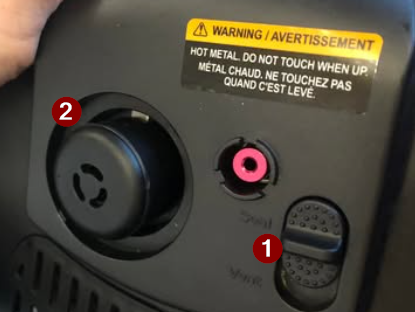
Step 2: Check whether the steam knob (2) is properly installed.
Gently pull the steam knob upwards. If it comes off without resistance, the knob is not properly installed or the seal ring (3) is worn out. This ring should look like the one below (3). If it is damaged or worn, we can provide a replacement. You may email us a photo for verification.
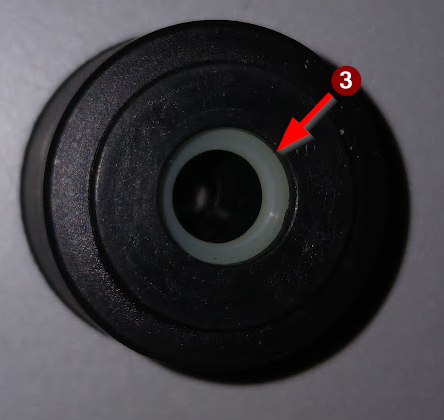
Step 3: Remove the steam knob and turn it upside down. You will see one of the following situations:
Top photos: the seal is missing and the steam knob is defective. We can supply a new one.
Bottom photo: you can see a silicone seal. The steam knob is fine.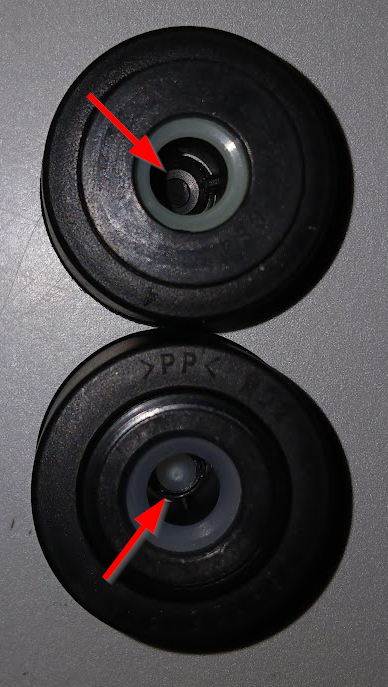
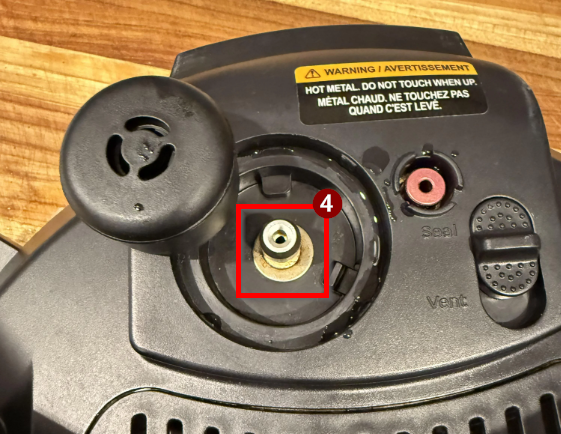
Step 4: If the inner seal is present (lower photo above) and the seal ring is intact, place the steam knob back on the steam pipe (4). Then press the steam knob down until you feel a click and it snaps into place. When you gently lift the knob, it should move up by about a millimeter, then the seal ring will hold it in place and prevent further movement. The steam knob should now be properly installed and should not release steam as long as the steam switch is set to “Seal”.